<?xml version="1.0" encoding="UTF-8"?>
<rss version="2.0"
	xmlns:content="http://purl.org/rss/1.0/modules/content/"
	xmlns:wfw="http://wellformedweb.org/CommentAPI/"
	xmlns:dc="http://purl.org/dc/elements/1.1/"
	xmlns:atom="http://www.w3.org/2005/Atom"
	xmlns:sy="http://purl.org/rss/1.0/modules/syndication/"
	xmlns:slash="http://purl.org/rss/1.0/modules/slash/"
	>

<channel>
	<title>briksoftware Blog</title>
	<atom:link href="http://briksoftware.com/blog/?feed=rss2" rel="self" type="application/rss+xml" />
	<link>http://briksoftware.com/blog</link>
	<description></description>
	<lastBuildDate>Tue, 10 Aug 2010 20:57:42 +0000</lastBuildDate>
	<language>en</language>
	<sy:updatePeriod>hourly</sy:updatePeriod>
	<sy:updateFrequency>1</sy:updateFrequency>
	<generator>http://wordpress.org/?v=3.0.1</generator>
		<item>
		<title>Automatically Rearrange Your UI on Rotation</title>
		<link>http://briksoftware.com/blog/?p=136</link>
		<comments>http://briksoftware.com/blog/?p=136#comments</comments>
		<pubDate>Tue, 10 Aug 2010 20:44:26 +0000</pubDate>
		<dc:creator>Karsten</dc:creator>
				<category><![CDATA[Developing on Mac OS X]]></category>

		<guid isPermaLink="false">http://briksoftware.com/blog/?p=136</guid>
		<description><![CDATA[Last weekend I&#8217;ve started to write my first real iPhone app. At one point I thought that the app worked pretty well in Portrait mode, but it could also work pretty nicely in Landscape mode. However, I didn&#8217;t just want to rotate each view but instead have a different layout of the view. I didn&#8217;t [...]]]></description>
			<content:encoded><![CDATA[<p>Last weekend I&#8217;ve started to write my first real iPhone app. At one point I thought that the app worked pretty well in Portrait mode, but it could also work pretty nicely in Landscape mode.</p>
<p>However, I didn&#8217;t just want to rotate each view but instead have a different layout of the view. I didn&#8217;t want to hardcode all the positions so I though about something along the lines of creating a second xib file that works as a template to arrange the original xib&#8217;s views for landscape.</p>
<p>It turns out that this is actually pretty easy. As long as the views are in the same structure in both xib files, one can just traverse the view tree by iterating over the subviews of a view.</p>
<p>I&#8217;ve created a class called BSUIViewRearranger. It can be used pretty easily by calling the following code in your view controller:</p>
<pre style="margin: 0.0px 0.0px 0.0px 0.0px; font: 11.0px Menlo; color: #508187;"><span style="color: #FFFFFF;">﻿[</span>BSUIViewRearranger<span style="color: #000000;"> </span><span style="color: #32595d;">rearrangeView</span><span style="color: #fff;">: </span><span style="color: #bb23a0;">self</span><span style="color: #000000;">.</span><span style="color: #733aa7;">view</span></pre>
<pre style="color:#fff;margin: 0.0px 0.0px 0.0px 0.0px; font: 11.0px Menlo;"><span style="color: #32595d;">                            toMode</span>: toInterfaceOrientation </pre>
<pre style="margin: 0.0px 0.0px 0.0px 0.0px; font: 11.0px Menlo; color: #d0271c;"><span style="color: #fff;">                 </span><span style="color: #32595d;">usingLandscapeNib</span><span style="color: #fff;">: </span>@"MainViewLandscape"<span style="color: #000000;"> </span></pre>
<pre style="margin: 0.0px 0.0px 0.0px 0.0px; font: 11.0px Menlo;color:#fff;">                       <span style="color: #32595d;">portraitNib</span>: <span style="color: #d0271c;">@"MainView"</span></pre>
<pre style="margin: 0.0px 0.0px 0.0px 0.0px; font: 11.0px Menlo;">                   <span style="color: #32595d;">controllerClass</span>: [<span style="color: #bb23a0;">self</span> <span style="color: #401a7f;">class</span>]];</pre>
<p> </p>
<div>just put that inside your -willRotateToIntefaceOrientation:duration: method and you&#8217;re done. Optionally one can wrap it in a ﻿<span style="font-family: Menlo; font-size: small;"><span style="font-size: 11px;">view animation block like so:</span></span></div>
<pre><span style="color: #401a7f; font-family: Menlo; font-size: 11px;"><span style="color: #fff;">[</span></span><span style="color: #401a7f; font-family: Menlo; font-size: 11px;"><span style="color: #508187;">UIView</span></span><span style="color: #401a7f; font-family: Menlo; font-size: 11px;"><span style="color: #000000;"> </span></span><span style="color: #32595d; font-family: Menlo; font-size: 11px;">animateWithDuration</span><span style="color: #32595d; font-family: Menlo; font-size: 11px;"><span style="color: #fff;">:</span><span style="color: #bb23a0">duration </span></span><span style="color: #32595d; font-family: Menlo; font-size: 11px;">animations</span><span style="color: #401a7f; font-family: Menlo; font-size: 11px;"><span style="color: #fff;">:^(</span></span><span style="color: #401a7f; font-family: Menlo; font-size: 11px;"><span style="color: #bb23a0;">void</span></span><span style="color: #fff; font-family: Menlo; font-size: 11px;"><span style="color: #ffff;">) </span></span><span style="font-family: Menlo; font-size: 11px;">{</span>
<span style="white-space: pre;"> </span><span style="color: #fff;">// code here
}];</span></pre>
<p>I&#8217;ve released the code on <a href="http://github.com/karstenBriksoft/BSUIViewRearranger">github</a> in case someone wants it.</p>
<p>@_karsten_</p>
<p> </p>
]]></content:encoded>
			<wfw:commentRss>http://briksoftware.com/blog/?feed=rss2&amp;p=136</wfw:commentRss>
		<slash:comments>0</slash:comments>
		</item>
		<item>
		<title>Dealing with Crashlogs</title>
		<link>http://briksoftware.com/blog/?p=130</link>
		<comments>http://briksoftware.com/blog/?p=130#comments</comments>
		<pubDate>Wed, 21 Jul 2010 20:25:36 +0000</pubDate>
		<dc:creator>Karsten</dc:creator>
				<category><![CDATA[News]]></category>

		<guid isPermaLink="false">http://briksoftware.com/blog/?p=130</guid>
		<description><![CDATA[I&#8217;ve already written about why every developer should know his way around with otx so this is sort of like a follow up on this topic. Today Peter Hosey asked on Stack Overflow about an interesting stack trace. Obviously the writeWithFormat() function didn&#8217;t crash recursively. So it appears that the crashlog is lying to us [...]]]></description>
			<content:encoded><![CDATA[<p>I&#8217;ve already written about <a href="http://briksoftware.com/blog/?p=11">why every developer should know his way around with otx</a> so this is sort of like a follow up on this topic.</p>
<p>Today <a href="http://boredzo.org/blog/">Peter Hosey</a> asked on Stack Overflow about <a href="http://stackoverflow.com/questions/3302428/calls-itself-except-it-doesnt">an interesting stack trace</a>. Obviously the writeWithFormat() function didn&#8217;t crash recursively. So it appears that the crashlog is lying to us about the function that makes trouble. No need to panic, there&#8217;s plenty of useful information left in the crashlog to help us find the bug. First of all there are offsets:</p>
<pre>0   com.growl.GrowlSafari        <strong>0x179d383c</strong> writeWithFormat + 25</pre>
<pre>1   com.growl.GrowlSafari        <strong>0x179d388e</strong> writeWithFormat + 107</pre>
<pre>2   com.growl.GrowlSafari        <strong>0x179d388e</strong> writeWithFormat + 107</pre>
<pre>... </pre>
<p>So the first frame is at offset 0x179d383c and all the other frames are at offset 0x179d388e. The only way to make sense out of these numbers is to use <a href="http://otx.osxninja.com/">otx</a> to disassemble the binary and look at the offsets to find out what&#8217;s really being called (the current svn version of otx is much more current, if you don&#8217;t mind compiling the tool yourself)﻿.</p>
<p>Before we can start disassembling we first need to know which file to disassemble. Fortunately the crashlog contains that information at the very beginning.</p>
<pre>Process:         Safari [2062]</pre>
<pre>Path:            /Applications/Safari.app/Contents/MacOS/Safari</pre>
<pre>Identifier:      com.apple.Safari</pre>
<pre>Version:         5.0 (6533.16)</pre>
<pre>Build Info:      WebBrowser-75331600~5</pre>
<pre>Code Type:       X86 (Native)</pre>
<pre>Parent Process:  launchd [84]</pre>
<pre>PlugIn Path:       /Applications/GrowlSafari.app/Contents/Resources/GrowlSafari.bundle/Contents/MacOS/GrowlSafari</pre>
<pre>PlugIn Identifier: com.growl.GrowlSafari</pre>
<pre>PlugIn Version:    1.2.1 (1.2.1)﻿</pre>
<p>So i&#8217;m sure everyone agrees that Safari doesn&#8217;t need to be disassemble, even though the crashlog says so in the Path. The crashlog is kind enough to tell us which plugin causes the crash, so we can take the plugin&#8217;s path as input to otx and pipe it to <a href="http://barebones.com/products/textwrangler/">TextWrangler</a>&#8216;s command line tool:</p>
<pre>otx -arch i386 /<span style="font-family: monospace; white-space: pre;">Applications/GrowlSafari.app/Contents/Resources/GrowlSafari.bundle/Contents/MacOS/GrowlSafari﻿ | edit</span></pre>
<p>Another indication to disassemble the plugin are the frames, as they all contain the identifier of their bundle: <strong>com.growl.GrowlSafari.</strong></p>
<p>So now we have the disassembly of the plugin, but the offsets of the crashlog cannot be found. The offsets produced by otx start at 0x00000f54﻿ and go to 0x000024f3﻿. That&#8217;s not nearly close to 0x179d383c﻿. The reason behind that is simple: the plugin&#8217;s code is mapped into the memory where the linker things it got some space left. So we need to find out where the plugin was mapped in order to find the right spot in the disassembly.</p>
<p>Again, the crashlog got all the information that is needed. At the end of the crashlog is a list of all the plugins, frameworks and bundles, that are loaded into the application at the time when the crashlog was taken.</p>
<p>It looks like:</p>
<pre>Binary Images:</pre>
<pre>    0x1000 -   0x526ffb  com.apple.Safari 5.0 (6533.16) &lt;5CC91F2A-7709-6B9E-069D-C6E408F1A14B&gt; /Applications/Safari.app/Contents/MacOS/Safari</pre>
<pre> 0x1340000 -  0x1340ffc +com.growl.GrowlSafariLoader 1.1.6 (1.1.6) &lt;BF586D9F-39A9-BD06-1C83-6F1E527822CA&gt; /Library/InputManagers/GrowlSafari/GrowlSafariLoader.bundle/Contents/MacOS/GrowlSafariLoader</pre>
<pre> 0x13b3000 -  0x13b3ff7  com.apple.JavaPluginCocoa 13.2.0 (13.2.0) &lt;6330F04D-3250-2071-42E4-0ABB54216529&gt; /System/Library/Frameworks/JavaVM.framework/Versions/A/Resources/JavaPluginCocoa.bundle/Contents/MacOS/JavaPluginCocoa</pre>
<p>So the first two numbers are the start and end offsets of the mapped binary. The application itself is typically mapped to the beginning, which always starts at 0&#215;1000. The provided information also includes the bundle identifier, version numbers, a unique id and the path. I have actually no idea what the + before com.growl.GrowlSafariLoader stands for, so if anyone knows, please tell me <img src='http://briksoftware.com/blog/wp-includes/images/smilies/icon_smile.gif' alt=':-)' class='wp-smiley' /> .</p>
<p>Searching for our bundle identifer reveals this line:</p>
<pre>0x179d2000 - 0x179d4ff7 +com.growl.GrowlSafari 1.2.1 (1.2.1) &lt;10F1EF69-D655-CCEE-DF3A-1F6C0CF541D3&gt; /Applications/GrowlSafari.app/Contents/Resources/GrowlSafari.bundle/Contents/MacOS/GrowlSafari</pre>
<p>﻿It appears that 0x179d2000 is our base offset. Subtracting that from our offsets gives us the offsets 0x183c and 0x188e. Subtracting is pretty easy in our case, but in general subtracting hex numbers is done easiest in gdb:</p>
<pre>p/x 0x179d383c - 0x179d2000﻿</pre>
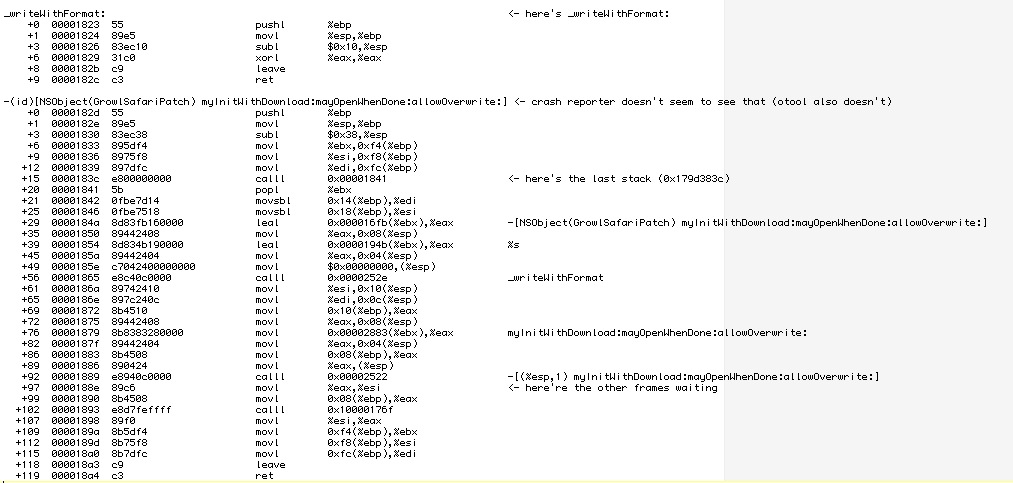
<p>Now that we have our correct offsets, we can have a look at the disassembly of that offset to see what&#8217;s going on.</p>
<p><img title="SafariGrowlDump.jpg" src="http://briksoftware.com/blog/wp-content/uploads/2010/07/SafariGrowlDump.jpg" border="0" alt="SafariGrowl disassembled" width="1013" height="483" /></p>
<p>i&#8217;ve already added some comments at the two offsets that are shown in the stack trace. First thing that one sees is that the disassembly has proper method names and the offsets both are inside the myInitWithDownload:mayOpenWhenDone:allowOverwrite:﻿ method. At offset 0x188e (the offset that all the frames show) there&#8217;s a movl instruction, but this is not the instruction we are looking for. The instruction right before the movl is a calll instruction. As the name suggest, it calls a function but on return it continues at offset 0x188e, which is why we see this offset in the stack trace. Otx is kind enough to annotate the calll instruction with Objective-C-like comments that show which function is called. It appears that the function calls itself, thus causing a recursion and the crash. Usually one wouldn&#8217;t program a function to call itself, but in that case the method is part of a <a href="http://www.cocoadev.com/index.pl?MethodSwizzling">MethodSwizzle</a>, where this is normal behavior (MethodSwizzling can be done easily with <a href="http://rentzsch.com/">Wolf Rentzsch</a>&#8216;s <a href="http://github.com/rentzsch/jrswizzle">JRSwizzle</a> project).</p>
<p>So why is the method swizzling not working in our case? The answer is again shown in the crashlog: there are actually two versions of the plugin loaded into Safari at the same time.</p>
<pre> 0x140c000 -  0x140efff +com.growl.GrowlSafari 1.1.6 (1.1.6) &lt;1E774BDF-5CC5-4876-7C66-380EBFEAF190&gt; /Library/InputManagers/GrowlSafari/GrowlSafariLoader.bundle/Contents/PlugIns/GrowlSafari.bundle/Contents/MacOS/GrowlSafari</pre>
<pre>0x179d2000 - 0x179d4ff7 +com.growl.GrowlSafari 1.2.1 (1.2.1) &lt;10F1EF69-D655-CCEE-DF3A-1F6C0CF541D3&gt; /Applications/GrowlSafari.app/Contents/Resources/GrowlSafari.bundle/Contents/MacOS/GrowlSafari</pre>
<p>﻿I think the reason for the crash is that both plugins define the same method and when the second plugin swizzles its methods, the original implementation of Safari is probably swizzled out and only the two patched methods are left. I think the older patch is called first, resulting in a call to the new patch, which then recursively calls itself. Maybe before swizzling two methods one should check if there was a swizzle before and reverse it before applying a second swizzle.</p>
<p>But those mind swizzling details are probably not too important for the actual fix for this crash and also don&#8217;t have much to do with our little excursus to crashlogs-wonderland. I hope you enjoyed the trip <img src='http://briksoftware.com/blog/wp-includes/images/smilies/icon_biggrin.gif' alt=':-D' class='wp-smiley' /> </p>
<p><a href="http://twitter.com/_karsten_">@_karsten_</a></p>
<p><a href="http://twitter.com/_karsten_"></a></p>
]]></content:encoded>
			<wfw:commentRss>http://briksoftware.com/blog/?feed=rss2&amp;p=130</wfw:commentRss>
		<slash:comments>0</slash:comments>
		</item>
		<item>
		<title>NSCharacterSet bug in 10.5</title>
		<link>http://briksoftware.com/blog/?p=121</link>
		<comments>http://briksoftware.com/blog/?p=121#comments</comments>
		<pubDate>Mon, 17 May 2010 21:51:39 +0000</pubDate>
		<dc:creator>Karsten</dc:creator>
				<category><![CDATA[Developing on Mac OS X]]></category>

		<guid isPermaLink="false">http://briksoftware.com/blog/?p=121</guid>
		<description><![CDATA[I&#8217;ve just ran across a pretty unexpected bug in CuteClips. I was using NSCharacterSet to filter a String﻿. This kept locking up some users computers. Turns out this is a bug in Mac OS X 10.5. Snow Leopard doesn&#8217;t show this bug so I guess it&#8217;s useless to report that to Apple. The bug is [...]]]></description>
			<content:encoded><![CDATA[<p>I&#8217;ve just ran across a pretty unexpected bug in CuteClips. I was using NSCharacterSet to filter a String﻿. This kept locking up some users computers. Turns out this is a bug in Mac OS X 10.5. Snow Leopard doesn&#8217;t show this bug so I guess it&#8217;s useless to report that to Apple.</p>
<p>The bug is pretty easy to reproduce:</p>
<div style="font: normal normal normal 11px/normal Menlo; color: #733aa7; margin: 0px;">NSMutableCharacterSet<span style="color: white;">* characterSet = [</span>NSMutableCharacterSet<span style="color: white;"> </span><span style="color: #401a7f;">whitespaceAndNewlineCharacterSet</span><span style="color: white;">];</span></div>
<div style="font: normal normal normal 11px/normal Menlo; color: #401a7f; margin: 0px;"><span style="color: white;">[characterSet </span>formUnionWithCharacterSet<span style="color: white;">:[[</span><span style="color: #733aa7;">NSCharacterSet</span><span style="color: white;"> </span>alphanumericCharacterSet<span style="color: white;">] </span>invertedSet<span style="color: white;">]];</span></div>
<div style="font: normal normal normal 11px/normal Menlo; margin: 0px;"><span style="color: #733aa7;">NSString<span style="color: #d0271c;"><span style="color: white;">* longString = </span>@&#8221;"</span>;</span></div>
<div style="font: normal normal normal 11px/normal Menlo; color: #008516; margin: 0px;"><span style="color: white;"><span style="color: #733aa7;">NSString</span>* shortString = [longString <span style="color: #401a7f;">stringByTrimmingCharactersInSet</span>:characterSet];</span></div>
<div>
<p>The #stringByTrimmingCharactersInSet: Method will never return though. The easiest workaround is to check if the longString is empty, as the bug appears for empty strings.</p>
<p>@_karsten_</p>
</div>
<p> </p>
<p> </p>
]]></content:encoded>
			<wfw:commentRss>http://briksoftware.com/blog/?feed=rss2&amp;p=121</wfw:commentRss>
		<slash:comments>0</slash:comments>
		</item>
		<item>
		<title>Xcode Run Script Build Phase debugging</title>
		<link>http://briksoftware.com/blog/?p=120</link>
		<comments>http://briksoftware.com/blog/?p=120#comments</comments>
		<pubDate>Thu, 25 Mar 2010 21:59:24 +0000</pubDate>
		<dc:creator>Karsten</dc:creator>
				<category><![CDATA[News]]></category>

		<guid isPermaLink="false">http://briksoftware.com/blog/?p=120</guid>
		<description><![CDATA[So I wanted to add a new build phase to my Xcode Project to run some shell script. It didn&#8217;t want to work and I&#8217;ve tried to find out why it didn&#8217;t work so I&#8217;ve tried some Logging. That turned out to be a bit tricky first as i&#8217;ve set Xcode to hide all messages [...]]]></description>
			<content:encoded><![CDATA[<p>So I wanted to add a new build phase to my Xcode Project to run some shell script. It didn&#8217;t want to work and I&#8217;ve tried to find out why it didn&#8217;t work so I&#8217;ve tried some Logging. That turned out to be a bit tricky first as i&#8217;ve set Xcode to hide all messages and only show warnings and errors. To work around this you simply need to create warnings or errors. That&#8217;s pretty easy actually as you only need to write &#8220;warning: ohoh&#8221; or &#8220;error: meh&#8221; and Xcode will automatically annotate the message as warning or error:</p>
<pre>
echo "warning: ohoh"
echo "error: meh"
</pre>
<p><img src="http://briksoftware.com/blog/wp-content/uploads/2010/03/error_messages_in_xcode.png" alt="Error Messages in Xcode" title=""></p>
<p>@_karsten_</p>
]]></content:encoded>
			<wfw:commentRss>http://briksoftware.com/blog/?feed=rss2&amp;p=120</wfw:commentRss>
		<slash:comments>3</slash:comments>
		</item>
		<item>
		<title>PlistExplorer on GitHub</title>
		<link>http://briksoftware.com/blog/?p=118</link>
		<comments>http://briksoftware.com/blog/?p=118#comments</comments>
		<pubDate>Mon, 18 Jan 2010 19:42:16 +0000</pubDate>
		<dc:creator>Karsten</dc:creator>
				<category><![CDATA[News]]></category>

		<guid isPermaLink="false">http://briksoftware.com/blog/?p=118</guid>
		<description><![CDATA[Ok, your wishes are heard. I&#8217;ve cleaned up the code and added PlistExplorer to GitHub. you can find it at: http://github.com/karstenBriksoft/PlistExplorer Karsten (@_karsten_)]]></description>
			<content:encoded><![CDATA[<p>Ok, your wishes are heard. I&#8217;ve cleaned up the code and added PlistExplorer to GitHub.</p>
<p>you can find it at: http://github.com/karstenBriksoft/PlistExplorer</p>
<p>Karsten (@_karsten_)</p>
]]></content:encoded>
			<wfw:commentRss>http://briksoftware.com/blog/?feed=rss2&amp;p=118</wfw:commentRss>
		<slash:comments>0</slash:comments>
		</item>
		<item>
		<title>Inspecting NSCoder Files</title>
		<link>http://briksoftware.com/blog/?p=117</link>
		<comments>http://briksoftware.com/blog/?p=117#comments</comments>
		<pubDate>Thu, 14 Jan 2010 09:00:14 +0000</pubDate>
		<dc:creator>Karsten</dc:creator>
				<category><![CDATA[News]]></category>

		<guid isPermaLink="false">http://briksoftware.com/blog/?p=117</guid>
		<description><![CDATA[One of the very handy features in Cocoa is NSCoder, it allows you to easily write your objects to a file. Your objects need to know how to encode and decode themselves with an NSCoder and that&#8217;s it. While this is pretty handy it also ties the created files tightly to your application. If you [...]]]></description>
			<content:encoded><![CDATA[<p>One of the very handy features in Cocoa is NSCoder, it allows you to easily write your objects to a file. Your objects need to know how to encode and decode themselves with an NSCoder and that&#8217;s it.</p>
<p>While this is pretty handy it also ties the created files tightly to your application. If you try to open such a file you need to have all the needed classes at hand. That&#8217;s a pretty ugly problem if you just want to know what&#8217;s inside the file.</p>
<p>Yesterday I had this exact problem and I&#8217;ve played around a bit until I had a tool that allows me to inspect any file that was written with an NSKeyedArchiver. NSArchiver is not yet supported.</p>
<p>Thanks to ObjC 2 this was relatively easy to do: If a class is missing, create it and retry to unarchive. That&#8217;s pretty brute force but I didn&#8217;t see no other way. With some private methods in NSKeyedArchiver I was also able to get all the keys of an Object. With the classes present and with the keys available I could then read all the Objects.</p>
<p>The tool is available here: <a href="http://www.briksoftware.com/files/PlistExplorer.zip">PlistExplorer.zip</a></p>
<p>Usage: PlistExplorer &lt;file><br />
It&#8217;ll write the content to stdout so you might want to pipe it to something like <a href="http://www.barebones.com/products/textwrangler/">TextWrangler</a>.</p>
<p>The tool comes with no warranty whatsoever. Use at your own risk.</p>
<p>Karsten (@_karsten_)</p>
]]></content:encoded>
			<wfw:commentRss>http://briksoftware.com/blog/?feed=rss2&amp;p=117</wfw:commentRss>
		<slash:comments>4</slash:comments>
		</item>
		<item>
		<title>Monster Localization</title>
		<link>http://briksoftware.com/blog/?p=114</link>
		<comments>http://briksoftware.com/blog/?p=114#comments</comments>
		<pubDate>Sat, 09 Jan 2010 14:52:51 +0000</pubDate>
		<dc:creator>Karsten</dc:creator>
				<category><![CDATA[News]]></category>

		<guid isPermaLink="false">http://briksoftware.com/blog/?p=114</guid>
		<description><![CDATA[CuteClips 3 has been out since last May now and I&#8217;ve still had one big thing to add: Localization. Even though I&#8217;ve had the localized Nibs and strings files around, I didn&#8217;t find time yet to release a localized version. The long know problem was again that features were added I needed to update all [...]]]></description>
			<content:encoded><![CDATA[<p>CuteClips 3 has been out since last May now and I&#8217;ve still had one big thing to add: Localization. Even though I&#8217;ve had the localized Nibs and strings files around, I didn&#8217;t find time yet to release a localized version. The long know problem was again that features were added I needed to update all those Nibs again. </p>
<p>After reading <a href="http://wilshipley.com/blog/2009/10/pimp-my-code-part-17-lost-in.html">Pimp My Code 17: Lost in Translation</a> I knew that this was gonna be the way to go for CuteClip&#8217;s Localization. I&#8217;ve finally had time to implement things. However, it was a bit messy and didn&#8217;t work out of the box as I would have expected it. So here&#8217;s a small Q/A of the questions that I came up with during the change.</p>
<p><br/></p>
<p><strong>Which strings go to which file?</strong></p>
<p>Strings from the application that are used like NSLocalizedString(&#8220;key&#8221;,&#8221;comment&#8221;); go to Localizable.strings. Same as usual. Strings of Nibs however go into NibName.strings.<br />
    <em>I.e: MainMenu.nib or MainMenu.xib has its strings in MainMenu.strings.</em>    </p>
<p><br/></p>
<p><strong>CuteClips uses plugins a bundles a lot. How are those Nibs looked up?</strong></p>
<p>
    The lookup-change in DMLocalizedNibBundle.m is implemented on class-side in NSBundle. Every instance call is sent to [NSBundle mainBundle]. So all strings-files need to go to the MainBundle&#8217;s Resources folder.<br />
    If your plugins have a MainMenu.xib then there&#8217;s no separate file. If your plugin has a different name, like in CuteClips, you end up have multiple strings files.<br />
    <em>I.e: Here i&#8217;ve got Localizable.strings, MainMenu.strings and OldUI.strings</em></p>
<p><br/></p>
<p><strong>How the heck do I convert my existing localized Nibs to strings files?</strong></p>
<p>That&#8217;s a bit tricky! First you need to get the strings out of the Nib, which can easily done by using ibtool:<br />
    <em>ibtool &#8212;generate-stringsfile MainMenu.strings MainMenu.nib</em></p>
<p>Not too difficult, but the devil is in the details: If that was a german Nib and you got a button called &#8220;Abbrechen&#8221; you wouldn&#8217;t find a line like <i>&#8220;Cancel&#8221; = &#8220;Abbrechen&#8221;;</i> in the strings-file. Instead you&#8217;ll have &#8220;Abbrechen&#8221; = &#8220;Abbrechen&#8221;. That doesn&#8217;t help much when your application tries to translate &#8220;Cancel&#8221; as it wouln&#8217;t find the key. Luckily that&#8217;s not the only information that you can find in the strings-file. Each translation also has a comment next to it that contains an ObjectId. Using this ObjectId you can use the english MainMenu.strings to convert the keys of the german MainMenu.strings. That doesn&#8217;t work for all translations though, so you need to fix the files by hand as well.</p>
<p>Another problem here is that many translations appear multiple times, so you might want to get rid of the clones.</p>
<p>I&#8217;ve written a little Smalltalk tool in <a href="http://www.cincomsmalltalk.com">VisualWorks</a> but it should work in any Smalltalk Environment. Usage is simple:</p>
<pre>
    to convert the translation-keys to english:
    Converter new convert: '/Path/To/Project/German.lproj'
    to filter out the clones:
    Converter new filter: '/Path/To/Project/German.lproj'
     </pre>
<p>The tool will create *.fixed.strings files by default.</p>
<p>You can load the tool at:<a href="http://briksoftware.com/blog/wp-content/uploads/2010/01/TranslationScanner.st.zip">TranslationScanner</a></p>
<p>I think that&#8217;s it.</p>
<p>One thing that i&#8217;d like to add: One of my resolutions for this year is finally joining Twitter. I did so on the last day of 2009 and my nick is <strong>_karsten_</strong>.</p>
<p>Happy New Year!<br/><br />
Karsten</p>
]]></content:encoded>
			<wfw:commentRss>http://briksoftware.com/blog/?feed=rss2&amp;p=114</wfw:commentRss>
		<slash:comments>0</slash:comments>
		</item>
		<item>
		<title>Downtime</title>
		<link>http://briksoftware.com/blog/?p=111</link>
		<comments>http://briksoftware.com/blog/?p=111#comments</comments>
		<pubDate>Sat, 07 Feb 2009 18:48:43 +0000</pubDate>
		<dc:creator>Michele</dc:creator>
				<category><![CDATA[News]]></category>

		<guid isPermaLink="false">http://briksoftware.com/blog/?p=111</guid>
		<description><![CDATA[Today all our services (briksoftware.com, snapplr.com, pdfkey.com) have been down for about 10 minutes. Some however may have had problems for much longer time, as we changed our IP address and DNS takes some time to propagate. This was caused by the fact that we migrated to a new, more powerful server in order to [...]]]></description>
			<content:encoded><![CDATA[<p>Today all our services (briksoftware.com, snapplr.com, pdfkey.com) have been down for about 10 minutes. Some however may have had problems for much longer time, as we changed our IP address and DNS takes some time to propagate.</p>
<p>This was caused by the fact that we migrated to a new, more powerful server in order to better satisfy the sudden increase in traffic generated by the incredible interest Snapplr caused <img src='http://briksoftware.com/blog/wp-includes/images/smilies/icon_biggrin.gif' alt=':D' class='wp-smiley' /> </p>
<p>I apologize for any inconvenience this has caused you, but now we are Harder, Better, Faster, Stronger <img src='http://briksoftware.com/blog/wp-includes/images/smilies/icon_biggrin.gif' alt=':D' class='wp-smiley' /> </p>
]]></content:encoded>
			<wfw:commentRss>http://briksoftware.com/blog/?feed=rss2&amp;p=111</wfw:commentRss>
		<slash:comments>0</slash:comments>
		</item>
		<item>
		<title>Snapplr 1.0</title>
		<link>http://briksoftware.com/blog/?p=107</link>
		<comments>http://briksoftware.com/blog/?p=107#comments</comments>
		<pubDate>Mon, 26 Jan 2009 19:41:05 +0000</pubDate>
		<dc:creator>Michele</dc:creator>
				<category><![CDATA[News]]></category>

		<guid isPermaLink="false">http://briksoftware.com/blog/?p=107</guid>
		<description><![CDATA[We are extremely excited today. Snapplr finally reached 1.0! After much coding, improving, and digging around Mac OS X internals we can finally share this great utility with you. Plans for the future are grand, but of course we cannot reveal anything yet. Stay tuned, and enjoy Snapplr!]]></description>
			<content:encoded><![CDATA[<p>We are extremely excited today. <a href="http://snapplr.com">Snapplr</a> finally reached 1.0! After much coding, improving, and digging around Mac OS X internals we can finally share this great utility with you.</p>
<p>Plans for the future are grand, but of course we cannot reveal anything yet. Stay tuned, and enjoy Snapplr!</p>
]]></content:encoded>
			<wfw:commentRss>http://briksoftware.com/blog/?feed=rss2&amp;p=107</wfw:commentRss>
		<slash:comments>6</slash:comments>
		</item>
		<item>
		<title>Snapplr progress</title>
		<link>http://briksoftware.com/blog/?p=106</link>
		<comments>http://briksoftware.com/blog/?p=106#comments</comments>
		<pubDate>Fri, 09 Jan 2009 00:40:43 +0000</pubDate>
		<dc:creator>Karsten</dc:creator>
				<category><![CDATA[News]]></category>

		<guid isPermaLink="false">http://briksoftware.com/blog/?p=106</guid>
		<description><![CDATA[This year I&#8217;ve been on a trip to Rome during new year. I&#8217;ve visited Michele and we spent pretty much most of the time coding on Snapplr. After one week of rewriting the screenshot selection from scratch, we had a new beta of Snapplr available. We&#8217;re proud to say that the selection is now exactly [...]]]></description>
			<content:encoded><![CDATA[<p>This year I&#8217;ve been on a trip to Rome during new year. I&#8217;ve visited Michele and we spent pretty much most of the time coding on Snapplr. After one week of rewriting the screenshot selection from scratch, we had a new beta of <a href="http://www.snapplr.com">Snapplr</a> available. We&#8217;re proud to say that the selection is now exactly like in Mac OS X, except that you can still decide what to do with the screenshot after it is taken. </p>
<p>In the previous beta one could not make screenshots of menus or utility windows. The problem was that Snapplr always activated and thus deactivated the frontmost application. That was needed because Snapplr needs the keyboard input for best usability. The system&#8217;s screen capture tool doesn&#8217;t need to activate and still receives the keyboard events. We thought that if this tool can do that, Snapplr can do that as well.</p>
<p>NSApplications can&#8217;t capture all keyboard events when they&#8217;re not active. This seems to only works for command line applications&#8230; and only if you do an animal sacrifice at new moon <img src='http://briksoftware.com/blog/wp-includes/images/smilies/icon_wink.gif' alt=';-)' class='wp-smiley' /> . So we ended up extracting the screenshot selection into a new terminal tool that is now called by Snapplr upon activation. Unfortunately that also ment porting the NSView UI to a CoreGraphics UI.</p>
<p>During this week we really noticed that it totally pays out if you keep refactoring your code and if you have a good design. We could just drop a couple of classes in the main application and extract their functionality into the terminal tool without much effort.</p>
<p>We also updated the server-side of Snapplr. As of now it is not required to have accounts anymore. We decided that accounts are just too much of an inconvenience for the user.</p>
<p>The new beta is available to all existing beta users. The previous beta should automatically load the new version on launch.</p>
<p>Stay tuned, Snapplr just made a huge step towards final release.</p>
<p>Karsten</p>
<p><img src="http://briksoftware.com/blog/wp-content/uploads/2009/01/snapplr-screenshot-small.png" alt="Snapplr Screenshot Small" title=""></p>
]]></content:encoded>
			<wfw:commentRss>http://briksoftware.com/blog/?feed=rss2&amp;p=106</wfw:commentRss>
		<slash:comments>2</slash:comments>
		</item>
	</channel>
</rss>